The family safe word app · free on iOS

Know it's
really them.

Scammers call pretending to be your grandchild. Vishion gives your family a rotating safe word — two words that change through the day. Ask for them, and you know in seconds. It also checks any suspicious text, email, link or QR code.
Freeevery feature
No cardno subscription
0data ever sold
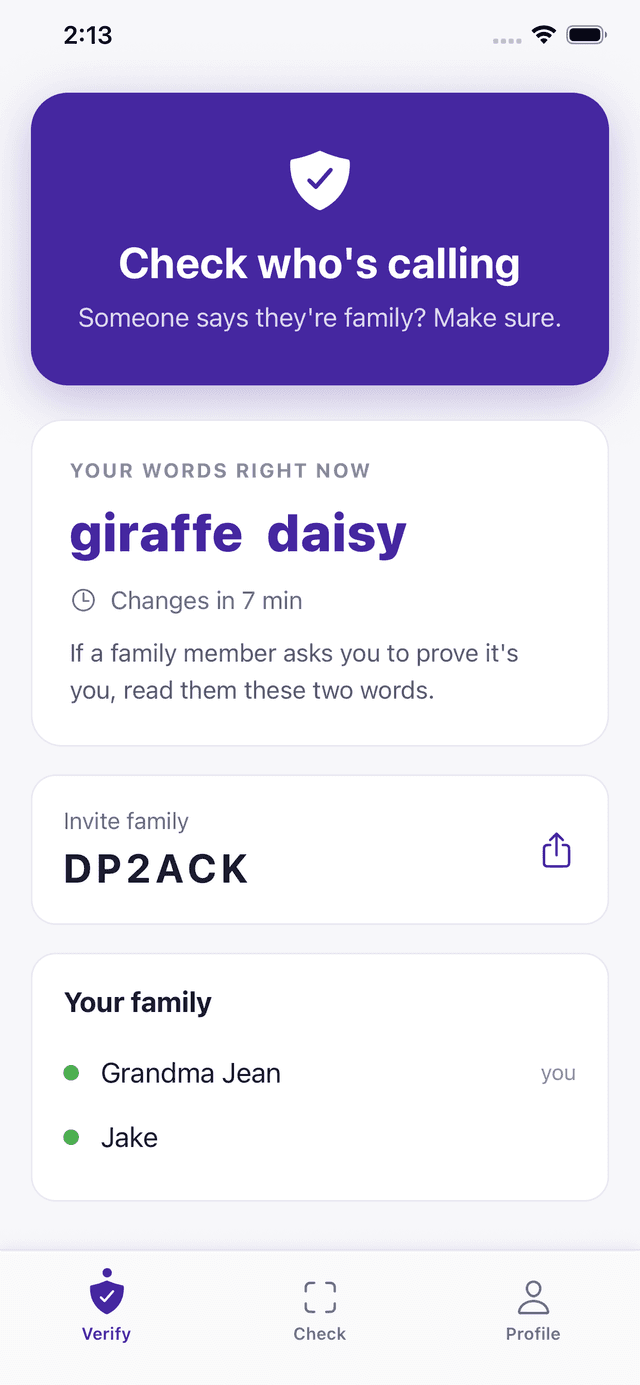
The Vishion Verify screen showing the two words shared by a family group and a countdown to when they change
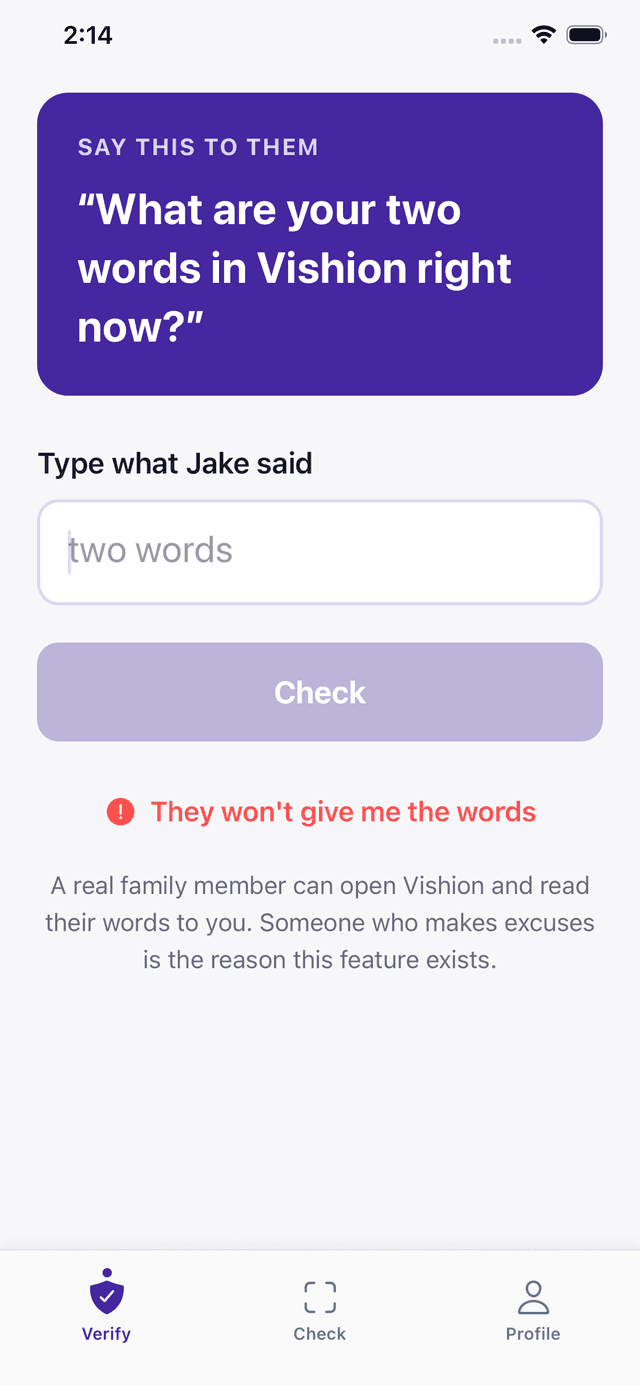
Vishion prompting the user to ask a caller for their two words, with a field to type what the caller said
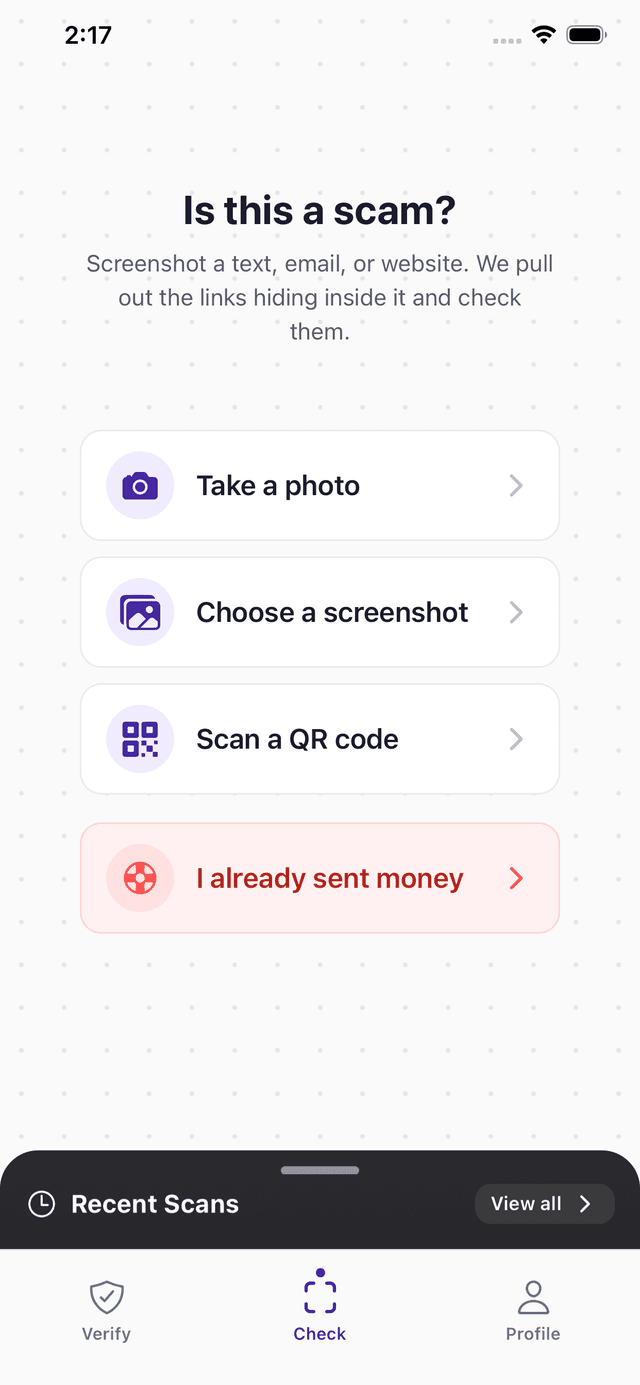
The Vishion Check screen offering to analyse a photo, a screenshot or a QR code
SMS phishing — spike +312% YoYQR scam stickers — reported in 47 citiesLookalike domains — 1.2M registered Q1 2026Average loss per smish victim — $1,420New in 2.0 — screenshots read on-device, never uploadedVishion — free, no subscriptionSMS phishing — spike +312% YoYQR scam stickers — reported in 47 citiesLookalike domains — 1.2M registered Q1 2026Average loss per smish victim — $1,420New in 2.0 — screenshots read on-device, never uploadedVishion — free, no subscription
// 01 — LIVE DEMO

Paste a message. Watch it think.

Click any sample — Vishion runs the same pipeline it uses on your phone, and shows its work.

SOURCESMS · pasted into Vishion
USPS: Your package #US9514901185421 is on hold due to incomplete address. Update here: usps-redeliver.info/track-2890
  • 01FETCHING
  • 02PARSING TOKENS
  • 03DOMAIN INTEL
  • 04VISUAL CLONE CHECK
  • 05LANGUAGE PATTERN
  • 06REPUTATION GRAPH
  • 07SCORING
EST. LATENCY~ 1.6s
··/100
ANALYZING
SIGNALS—
  • HIGHDomain 'usps-redeliver.info' impersonates usps.com
  • HIGHRegistered 4 days ago — typical of phishing infra
  • MEDUrgency pattern: 'on hold', 'update here'
  • MEDTracking number format does not match USPS schema
// 02 — COVERAGE

Four ways scammers reach you. One app for all of them.

From fake delivery texts to malicious QR codes, Vishion sees what slips past your guard.

// 01

Phishing SMS

Fake delivery alerts, bank warnings, and prize notifications hiding malicious links. Turn on the Messages filter and obvious scam texts from unknown numbers are junked automatically — on your phone, before you ever see them.

FROM: +1 (415) 555-0118
“USPS: pkg held — usps-redeliver.info”
▶ flagged · domain age 4d
// 02

Malicious QR codes

Scam codes pasted over parking meters, restaurant tables, and flyers — built to harvest cards.

QR PAYLOAD
parkpay-quickly.app/m/8821
▶ flagged · not a registered authority
// 03

Scam emails

Fake invoices, password resets, and account alerts engineered to steal your credentials.

FROM: security@app1e-id.com
“Sign-in from a Windows PC…”
▶ flagged · digit-for-letter spoof
// 04

Dangerous URLs

Lookalike domains and shortened links that quietly redirect to credential-harvesting pages.

HOPS: 2 redirects
chasebank-secure.account-verify.co
▶ flagged · visual clone of chase.com
// 03 — HOW IT WORKS

Three taps. One verdict.

Send it a screenshot, a link or a QR code. You get a plain answer, not a risk score to interpret.

01

Send anything sketchy.

Share a text, paste a link, point your camera at a QR code, or forward a suspicious email — straight from the share sheet.

Share sheet · Camera · Paste
02

Vishion analyzes it.

Your phone reads it first — screenshots are read on-device and clear scams are flagged right there, without touching the network. Anything uncertain goes to our AI as text; the picture itself stays on your phone.

On-device first · AI-backed
03

You get a clear answer.

A score from 0–100, the specific signals that triggered, and a one-tap action: block, report, or move on.

Plain English · Actionable
Free
Every feature
$0
No subscription
iOS
iPhone & iPad
2
Words to check a caller
// 04 — PRIVATE BY DESIGN

Your screenshots stay on your phone.

Vishion 2.0 does as much as possible on the device itself — using Apple's own frameworks, not a cloud pipeline.

01

Read on your phone.

When you scan a screenshot, the text is read on-device with Apple's Vision framework. The image is never uploaded — not to us, not to anyone.

Apple Vision · No upload
02

Verdicts without the network.

Clear scams — gift-card demands, callback billing cons, lookalike bank domains — are flagged entirely on the phone, with zero network calls. Only uncertain messages go to our AI, as text.

On-device rules · Works offline
03

Scam texts, junked automatically.

Turn on Vishion in Settings → Messages → Unknown & Spam, and iOS runs Vishion's filter on texts from unknown senders — fully offline. Obvious scams go straight to Junk. Your contacts and iMessages are never touched.

Messages filter · 100% offline
// 05 — DETAILS

Questions, answered.

Anything else? hello@vishion.ai

How does the two-word check work?

Everyone in your family group sees the same two words on their phone, and those words change through the day. When someone calls or texts claiming to be family, you ask for their two words. A real family member opens Vishion and says or texts them back. Someone pretending cannot — they would need a phone that is already in your group.

Why not just call them back on a number I know?

You still should, and Vishion tells you to. But calling back takes time you may not feel you have when someone sounds frightened, and it fails when the person genuinely is travelling or using a different phone. The two-word check settles it on the call you are already on.

Does Vishion read all my messages?

No. Vishion only sees what you explicitly send to it — via the share sheet, paste, or camera. There is no inbox monitoring, no SMS scraping, and no background access. The optional Messages filter is different by design: iOS runs it on your phone for texts from unknown senders only, entirely offline — nothing about those texts ever reaches Vishion or any server.

Where does the analysis run?

On your phone first. Screenshots are read on-device with Apple's Vision framework — the image itself is never uploaded. If the message is an obvious scam, Vishion tells you so entirely on-device, with no network involved. Only when the local check is unsure is the extracted text (not the picture) sent — with your permission, asked in the app — to Anthropic's Claude, the AI service that performs Vishion's cloud analysis. The two-word family check is fully on-device too — the words are derived from a secret shared only within your family group, and it keeps working with no signal.

Can Vishion filter scam texts automatically?

Yes, on iPhone. Turn it on in Settings → Apps → Messages → Unknown & Spam and choose Vishion. From then on, iOS shows Vishion each text from a number that is not in your contacts, and obvious scams are moved to the Junk section of Messages before you ever see a notification. The filter runs entirely on your phone — Apple does not allow it to access the internet, and texts from your saved contacts and iMessages are never filtered.

Is it really free?

Yes. Every feature, no subscription, no card, and no trial that runs out. There is nothing to buy inside the app.

What if Vishion gets it wrong?

You can rate any result in the app and leave a note. Vishion is a second opinion, not a guarantee — if something feels wrong, stop and check with someone you trust before sending money.

Which platforms?

iOS 15.1 or later. An Android version is in the works — the current Play Store listing is an old build and is being replaced.

Don't be the next victim.

Every feature is free. No subscription, no card, nothing that runs out.

Or try the demo with sample scams first